Golf Genius
- 4.8
- Rating
- 500.00K
- Installs
- Free
- Price

 Analysis by App-foxy
I found Golf Genius most useful when I treated it as a companion for organized golf rather than as a replacement for a full golf lesson, a standalone scorecard, or a general sports news app. It is a free sports app from Golf Genius Software, Inc., built around social and interactive functions for golfers who already have some connection to a club, event, or playing group. That focus makes it feel more purposeful than a broad golf utility, but it also means the experience depends heavily on how the people around you use it.
My overall impression is positive, especially for players who want golf to feel more connected before, during, and after a round. The app has been available since October 23, 2012, and its long presence helps explain why it feels aimed at established golf communities rather than casual one-time visitors. It is rated for Everyone, runs on operating system version 11 or later, and the current release is 17.2.0. Those details matter if you are deciding whether an older phone can handle it or whether the app fits a mixed-age group.
How Golf Genius handles readability and navigation
The first thing I noticed is that the app makes more sense when I approach it through a specific golf activity. Instead of opening it and expecting a wide collection of unrelated tools, I look for the event, group, or social function that matters to me. That narrower purpose can make navigation easier for someone who prefers a clear destination, although it may feel less obvious to a new user who has not yet joined anything.
You May Also Like

 Blood Strike: 2.5 Anniversary
Blood Strike’s Loadouts Turn Every Drop Into a Tactical Gamble
A close look at Blood Strike’s custom loadouts: how fast access to signature weapons reshapes its battle royale rhythm, rewards preparation, and narrows the gap between fights.

 Pandora - Music & Podcasts
Pandora’s Music Is Easy to Start, but Harder to Recover
Pandora’s strength is its low-effort path from a seed to a station. Its weak spot is how much confidence it asks you to place in connection, setup, and quiet recovery.

 8 Ball Pool
 Is Built on Rivalries, Rematches, and Routine
A close look at the rivalries, rematches, shared routines, and unanswered safety questions that turn a quick pool match into a persistent mobile community.

 Samsung Music
’s Quiet Strength Is Playing What You Already Own
Its reach comes less from spectacle than from dependable access to a personal library. That simplicity is both the app’s strongest retention engine and its ceiling.

 AccuWeather: Weather Radar
AccuWeather Review: A Quick, Clear Forecast for Everyday Decisions
For everyday plans, the best forecast is the one you can understand quickly. AccuWeather makes rain timing, radar, and local conditions easy to act on, with a few trade-offs.

 Hill Climb Racing
Why Hill Climb Racing Still Turns Crashes Into One More Run
A tiny car, a bumpy hill and one more upgrade: Hill Climb Racing keeps resurfacing because its simple chaos makes every near-miss feel personal.
More From Our News Desk



For a regular club member, this is a useful distinction. The app is not trying to be a giant encyclopedia of golf, and it does not bury its identity under unrelated content. I can think of it as a digital meeting point for golf activity. Once I understand that role, the interface is easier to interpret: I am looking for information connected to my playing community, not browsing a random stream of golf material.
Readability also depends on the amount of information attached to an event. A small, familiar group is likely to be easier to follow than a busy tournament with many participants and updates. That is not a flaw unique to this app; it is the natural trade-off of putting social and event information in one place. Still, a first-time user may need a moment to distinguish what is personally relevant from what belongs to the wider group.
I would recommend opening the app before the day of a round, while there is time to explore calmly. That simple habit reduces pressure for users who dislike learning a new interface at the course. It also gives me a chance to identify the important screen or event instead of trying to understand everything while other players are waiting.
One practical strength is that the app’s purpose can reduce the need to switch constantly between unrelated golf tools. If my group uses it consistently, I can keep the social side of an event in the same place rather than relying on scattered messages and separate scorekeeping habits. The benefit is greatest when everyone follows the same workflow. If only a few players use it, the organizational advantage becomes much smaller.
For people with reading difficulties, attention differences, or limited comfort with unfamiliar apps, I would suggest using the app alongside a trusted playing partner at first. Ask that person to show the event flow once, then repeat it independently. This is more realistic than assuming the app will explain every part of a club’s particular setup in exactly the way each user needs.
The app’s strong user response suggests that its basic purpose resonates with many golfers. It holds an average rating of 4.8 from roughly 4.4 thousand ratings, while its review count is around 267. I would not treat those figures as proof that every golfer will find navigation effortless, but they do indicate that the core experience has worked well for a substantial audience.
Useful navigation habits for a mixed-ability group
I found three habits especially valuable. First, keep the app updated before an important event rather than waiting until arrival. Second, identify the relevant golf activity in advance and avoid exploring unrelated areas when time is limited. Third, make sure a second person in the group knows the basic process. That last step is easy to overlook, but it prevents one participant from becoming the only person who understands the digital workflow.
These habits are particularly helpful for older golfers, players who are new to smartphones, and anyone who becomes uncomfortable when a group is waiting. They also help users who may need more time to read, tap, or confirm information. In my experience, inclusive design is not only about what appears on the screen; it is also about whether the surrounding group allows people to use the app without embarrassment or hurry.
Motor, visual, hearing, and sensory considerations on the course
Golf creates an unusual technology setting. I may be standing outdoors, wearing a glove, carrying equipment, dealing with bright light, and trying not to interrupt the pace of play. That means an app can be perfectly manageable at home but less comfortable on the course. With Golf Genius, I would prepare information before play whenever possible and keep phone interaction brief during the round.
For users with limited fine-motor control, small or rushed interactions can become tiring. A phone is harder to operate when one hand is occupied or when the user is wearing a golf glove. I would not plan a workflow that requires frequent detailed tapping between shots. Instead, I would complete setup in a quiet place and use the app at natural pauses, such as before the group begins or after finishing a hole.
Users with visual sensitivities may also find outdoor conditions more important than the app itself. Glare, changing brightness, and the contrast between shade and sunlight can make any mobile interface harder to read. I recommend checking the relevant information in a shaded area and increasing the device’s text or display settings if needed. That is a general phone adjustment, but it can make the difference between a relaxed experience and constant squinting.
For players with hearing loss, the app may be more useful when paired with clear visual communication from the group. I would not rely on a sound or spoken cue as the only way to know what is happening. A playing partner can confirm the event or next step in writing or face to face. This is also helpful in windy locations, near active clubhouses, or whenever ambient noise makes phone alerts easy to miss.
People with sensory sensitivities may prefer to avoid unnecessary browsing during a busy event. My advice is to decide in advance what information is essential and ignore the rest until later. The social side of the app can be enjoyable, but a crowded stream of activity may feel demanding for someone who prefers a quieter, more predictable experience.
There is an important trade-off here. Golf Genius can bring social interaction closer to the round, which is valuable for players who feel more included when they can follow the group’s activity. At the same time, more digital interaction can become another demand for players who want golf to remain mostly screen-free. I would use the app as a support layer, not as something that must occupy attention throughout the day.
A realistic round-day example
Imagine I am playing in a club event with a friend who reads slowly and another player who is not confident with smartphones. Before leaving home, I would open the app, locate the relevant event, and review the information that the group actually needs. At the course, I would avoid passing the phone around while everyone is preparing to play. Instead, I would explain the essential steps in plain language and let each person choose whether to follow along digitally.
During the round, I would use the app only at a comfortable pause. If my friend needs larger text or more time, I would not make that person operate the phone while the group is waiting. Afterward, the social features can be explored at a slower pace, when the pressure of play has disappeared. This workflow preserves the app’s interactive value without turning access into a test of speed, eyesight, or dexterity.
That scenario also shows why a supportive group matters. The same app can feel welcoming when players share the workload and frustrating when everyone assumes that each person will understand it immediately. Golf Genius is capable of supporting participation, but the social environment determines how inclusive that support feels in practice.
When situational access matters most
The app is most convincing for organized golf situations where several people need to stay connected around the same activity. It can be a good fit for a club event, a recurring group, or a social round in which participants want more interaction than a paper scorecard provides. The free price removes an obvious financial barrier, which is helpful for groups that want to invite occasional players without asking them to buy another golf product.
Its reach is already substantial, with more than 500 thousand installs. That does not guarantee that my own club uses it, but it makes the app recognizable enough to be worth checking before an event. The key question is not simply whether I like the app; it is whether the people organizing my golf activity have built their process around it.
For a golfer who plays alone and wants swing analysis, detailed course mapping, or a private training plan, I would look elsewhere. A specialist coaching app or a course-focused tool may be more appropriate for those goals. Golf Genius makes more sense when the social and event layer is the reason I am opening it.
Compared with paper, the app can make group participation feel more immediate and less dependent on one person carrying information. Paper remains easier for someone who wants zero setup, has limited phone access, or prefers a familiar physical record. The app’s advantage appears when the group values shared interaction and ongoing updates; paper’s advantage is simplicity and independence from a digital workflow.
Compared with general messaging apps, Golf Genius has a more golf-specific purpose. A chat service may be better for quick conversation, especially if every participant already uses it, but it can mix event details with unrelated messages. A dedicated golf environment can keep the activity more focused. The trade-off is that users may need to learn and maintain one more app instead of staying inside a tool they already know.
Compared with a traditional club website, the app is likely to feel more immediate for people who check their phones throughout the day. A website may remain preferable for users who want a larger screen, easier reading, or a slower information-gathering process. I would not force one format on everyone. The most inclusive arrangement is often to let the app serve active participants while keeping a clear non-app explanation available through the organizer.
One non-obvious point is that the app’s value can decrease sharply when adoption is uneven. If the organizer posts something in Golf Genius but several players never open it, the group may end up duplicating information through texts, calls, or printed notes. That is not a reason to reject the app, but it is a reason to agree on one primary communication method before the event.
Remaining barriers and who should think twice
The first barrier is dependence on context. Golf Genius is not equally useful to every golfer on every day. Its social and interactive character needs an active group or event behind it. If I download it without a clear reason to join or follow something, I may wonder what I am supposed to do next. That can feel like a lack of usefulness even when the app is working as intended.
The second barrier is the phone itself. Users on older devices may not meet the minimum operating system requirement of version 11. People with limited storage, unreliable connectivity, or a strong preference for offline routines may also find a phone-centered event workflow inconvenient. I would check the device requirement before asking less technical family members or clubmates to install it.
A third barrier is social pressure. Some golfers enjoy interactive features, while others want to focus on conversation, concentration, or the physical game. If a group treats app participation as mandatory, users with disabilities, low digital confidence, or sensory needs may feel singled out. The better approach is to make the app useful without making it the only route to participation.
There is also a learning curve for organizers. The app may be easy enough for a player once everything is arranged, but the person setting up or managing the group carries more responsibility. That person should explain the process clearly, avoid last-minute changes, and provide a backup way to receive essential information. A smooth player experience depends on preparation that may happen outside the app.
I would also be cautious about recommending it to someone who expects a complete golfing toolkit. The app’s identity is social and interactive, not a promise of every possible golf function. A player seeking instruction, equipment advice, deep performance analysis, or a substitute for professional coaching should choose a more specialized product. Using the wrong tool creates disappointment that is really a mismatch of expectations.
For a user with significant accessibility needs, I would test the exact event workflow before relying on it for an important day. Accessibility can vary according to the phone, display settings, event configuration, group communication, and the amount of outdoor use. I appreciate that the app can support participation, but I would still want a human backup and a non-digital explanation rather than assuming the app alone will solve every access issue.
Small changes that make participation fairer
Organizers can improve the experience by sharing essential instructions in advance, using plain language, and separating must-know details from optional social content. They should allow extra time for people who need it and avoid asking players to perform complicated phone actions while standing on the first tee. A printed or verbally explained fallback is not a failure of the app; it is good event planning.
Players can help by telling the group what kind of support works best for them. Some may need larger text, some may prefer spoken confirmation, and others may simply want to review information before arriving. I find that these small requests are easier to accommodate when they are made early rather than during a busy round.
Another useful trade-off is deciding when to engage socially. A player can use the app before and after golf while keeping the phone away during play. That approach preserves the interactive side without assuming that constant digital participation equals a better experience. For many users, especially those managing attention or sensory fatigue, this selective use is the most comfortable balance.
My inclusive verdict on Golf Genius
I recommend Golf Genius to golfers whose clubs or playing groups already use it for organized, social activity. It is free, established, and focused enough to give a group a shared digital space without pretending to be every golf tool at once. In my experience, it works best when the organizer communicates clearly and the group treats the app as an option that supports participation rather than a hurdle everyone must clear at the same speed.
The app is especially promising for players who enjoy staying connected to an event, families or mixed-age groups that want a shared golf experience, and clubs looking for something more interactive than a paper notice. Its Everyone age rating also makes it easier to consider for broad groups, although age suitability does not automatically guarantee that every person will find the interface or outdoor use comfortable.
I would skip it if I mainly want solo practice guidance, course analysis, or a simple offline scorecard. I would also hesitate if my group does not use it consistently, because the social benefit depends on shared participation. In those cases, a specialized golf app, a general messaging tool, a club website, or paper may be the better choice.
What I value most is the possibility of making a golf event feel less fragmented. What I would improve in my own use is the preparation: I would check compatibility, open the relevant activity early, adjust my phone for outdoor reading, and arrange a backup explanation for anyone who needs one. The fairest way to use Golf Genius is to let its social tools add connection without making digital speed a requirement for belonging.
With an average of 4.8 and over 500 thousand installs, it has clearly found a durable audience, but popularity should not replace personal testing. My final recommendation is practical: ask whether your club or group already relies on it, try the exact workflow before an important round, and decide how much interaction genuinely helps you. When those conditions line up, Golf Genius is a thoughtful sports companion; when they do not, a simpler or more specialized alternative will serve you better.
FAQs for Golf Genius
01What is Golf Genius and how does it work?
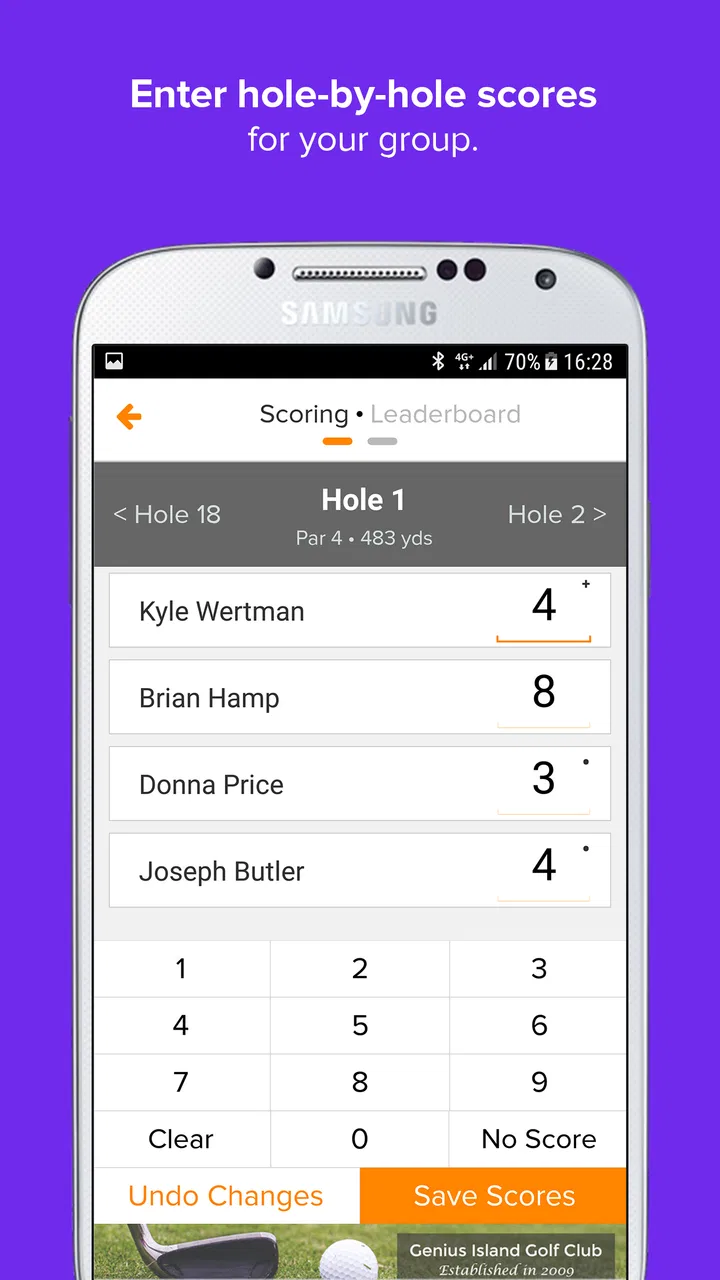
Golf Genius is a comprehensive golf tournament management application designed for both amateur and professional events. It offers features like tournament scheduling, live scoring, and real-time leaderboards. Users can easily register for events, view pairings, and receive instant notifications about updates. The app integrates seamlessly with existing golf club systems to streamline operations.
02Is Golf Genius available for both Android and iOS devices?
Yes, Golf Genius is available for download on both Android and iOS platforms. This ensures that users across different devices can access the app's features. You can download it from the Google Play Store for Android devices and the Apple App Store for iOS devices, providing a seamless experience regardless of your smartphone preference.
03Does Golf Genius require an internet connection to function?
While Golf Genius offers many features that can be accessed offline, such as viewing saved pairings and tournament details, an internet connection is necessary for live scoring, real-time leaderboard updates, and syncing data with the club's system. It is recommended to have a reliable internet connection for the best experience.
04Are there any costs associated with using Golf Genius?
Golf Genius offers a range of pricing options depending on the level of service required. Clubs and organizations typically handle subscription fees, allowing members and participants to use the app freely. However, it’s advisable to check with your club for specific details regarding any individual costs or subscriptions.
05How user-friendly is Golf Genius for newcomers?
Golf Genius is designed with user-friendliness in mind, featuring an intuitive interface that guides users through every step of tournament management. Newcomers will find the app easy to navigate, with clear instructions and helpful tips. Additionally, the app provides excellent customer support and tutorials to assist users in maximizing its features.
Pros
- User-friendly interface enhances experience.
- Comprehensive event management tools.
- Real-time scoring keeps players updated.
- Customizable features for personalized use.
- Reliable customer support available.
Cons
- Requires stable internet for full functionality.
- Can be overwhelming for first-time users.
- Limited offline capabilities.
- Subscription cost may be high for some.
- Occasional app updates can be disruptive.

Golf Genius
Gallery